


Classroom Panels and Learning Platforms
Panels that arrive without the right setup and software end up as expensive whiteboards. We deploy interactive panels in classrooms and build the learning management systems that make them useful, for panel makers, distributors, schools and universities.
- Network & Connectivity
- Security & Surveillance
- Connected Healthcare
- Smart Cities & Infrastructure
- Fleet & Logistics
- Energy & Smart Utilities
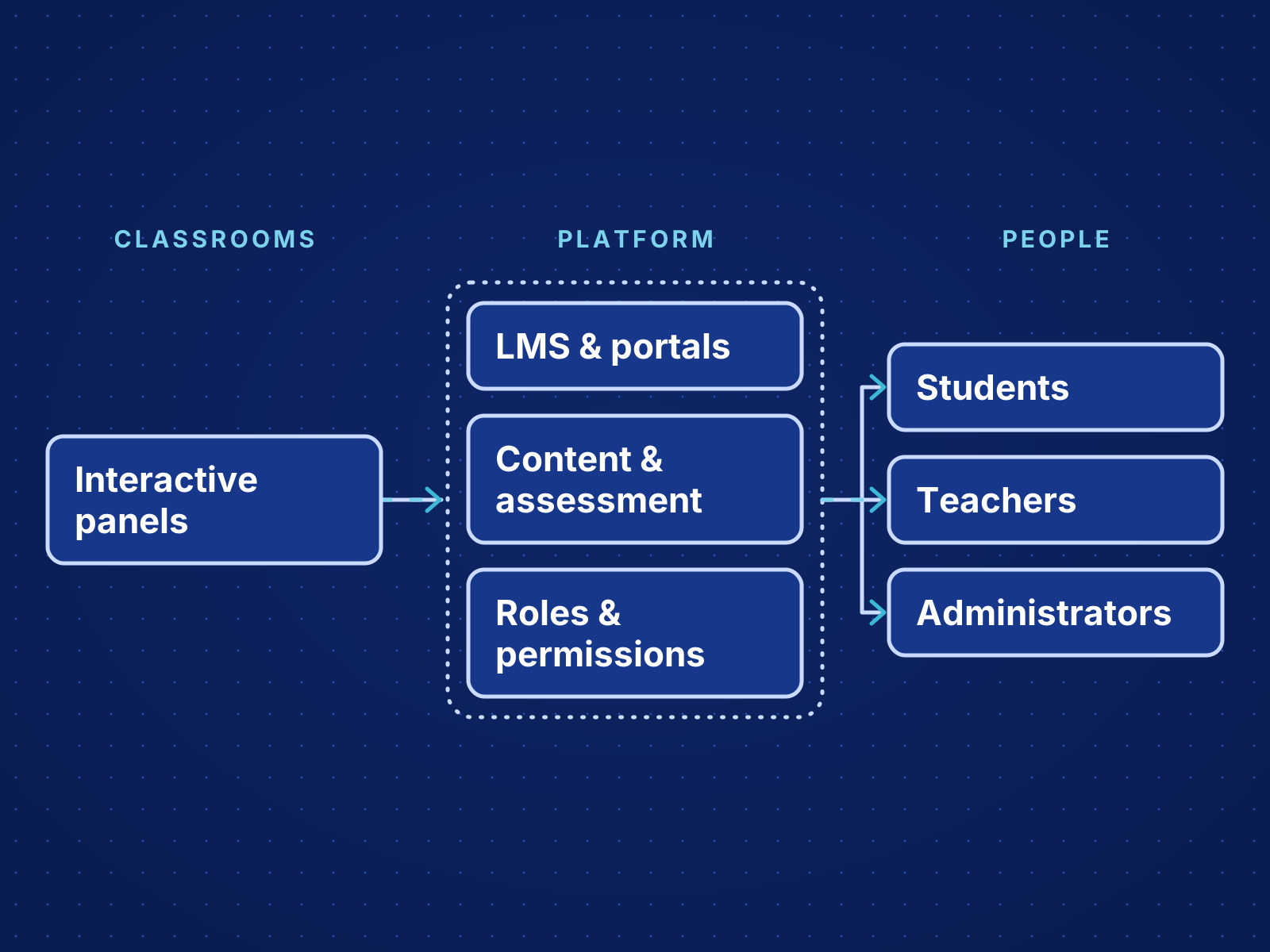
Panels and Platforms Planned Together
An education platform serves students, teachers and administrators at the same time, each with different tasks, permissions and reports. We design those roles first and the screens after, then content and assessment. Panel deployment is planned alongside, so the hardware in the classroom and the software teachers use arrive ready to work together.
What We Deliver
Interactive Panel Deployments
Interactive panels rolled out across classrooms and campuses and configured around how teachers teach.
Business Challenges We Address
Learning and Administration Apart
Courses, student records, content and reporting often live in separate systems.
More Than Content Uploads
Learning needs roles, progress tracking, communication and assessment organized around how the school teaches.
Classroom Hardware That Goes Underused
Panels arrive before the setup, content access and software teachers need, so they go unused.
Industry Use Cases
Institutional LMS
Courses, content, assessments and reporting in one learning system.
Student Portal Experience
Students see their courses, schedules, updates and submissions in one place.
Faculty and Admin Operations
Faculty manage content and review progress; administrators run school processes on the same platform.
Intended Outcomes
Panels in daily use, with the content and software teachers need.
One platform for students, teachers and administrators.
Clear visibility of learning progress and content use.
Room for new programs and courses without replatforming.
Delivery Experience & Deployments
Interactive Panel Deployments
Interactive panels deployed and configured in classrooms.
LMS & Student Portal Delivery
Learning management systems and student portals built and delivered.
Connectors & Systems
Deployment Models
Cloud
Wide access for remote learning and simple rollout to students and staff.
Private Cloud
Greater control over student data and access policies.
Hybrid
New learning tools connected to the school systems already in place.
Implementation Process
Classroom and User Discovery
We review classrooms, panels and how students, teachers and administrators work day to day.
Platform Architecture & Experience Design
We design roles, content structure, workflows, reporting and integrations.
Build & Validation
We build the system and test key flows with teachers and students before rollout.
Rollout and Training
We install, train staff, load content and refine the system through the school year.
Technologies & Delivery Models
Web Portal Experiences
The tools we rely on for this layer of the system.
Why KoderTroop for Education & Learning Solutions
Devices, cloud and applications delivered by one partner, with every decision documented and handed over.
Multi-Role Experience Design
Students, teachers and administrators each get the view their role needs, on one platform.
Operational Alignment
Teaching connects directly to reporting, communication and administration.
Long-Term Platform Flexibility
Room to add courses and programs over time.
Related Work
Frequently Asked Questions
Your Education & Learning Solutions Project
Tell us what you are building and the constraints around it. We will scope the work with you.
Classroom and User Discovery
We review classrooms, panels and how students, teachers and administrators work day to day.
Platform Architecture & Experience Design
We design roles, content structure, workflows, reporting and integrations.
Build & Validation
We build the system and test key flows with teachers and students before rollout.
Rollout and Training
We install, train staff, load content and refine the system through the school year.